Find your X bookmarks by keyword or meaning
Turn your X (formerly Twitter) bookmarks into a searchable local library. XMore runs full-text and semantic search in your browser over posts you have successfully synced or imported.
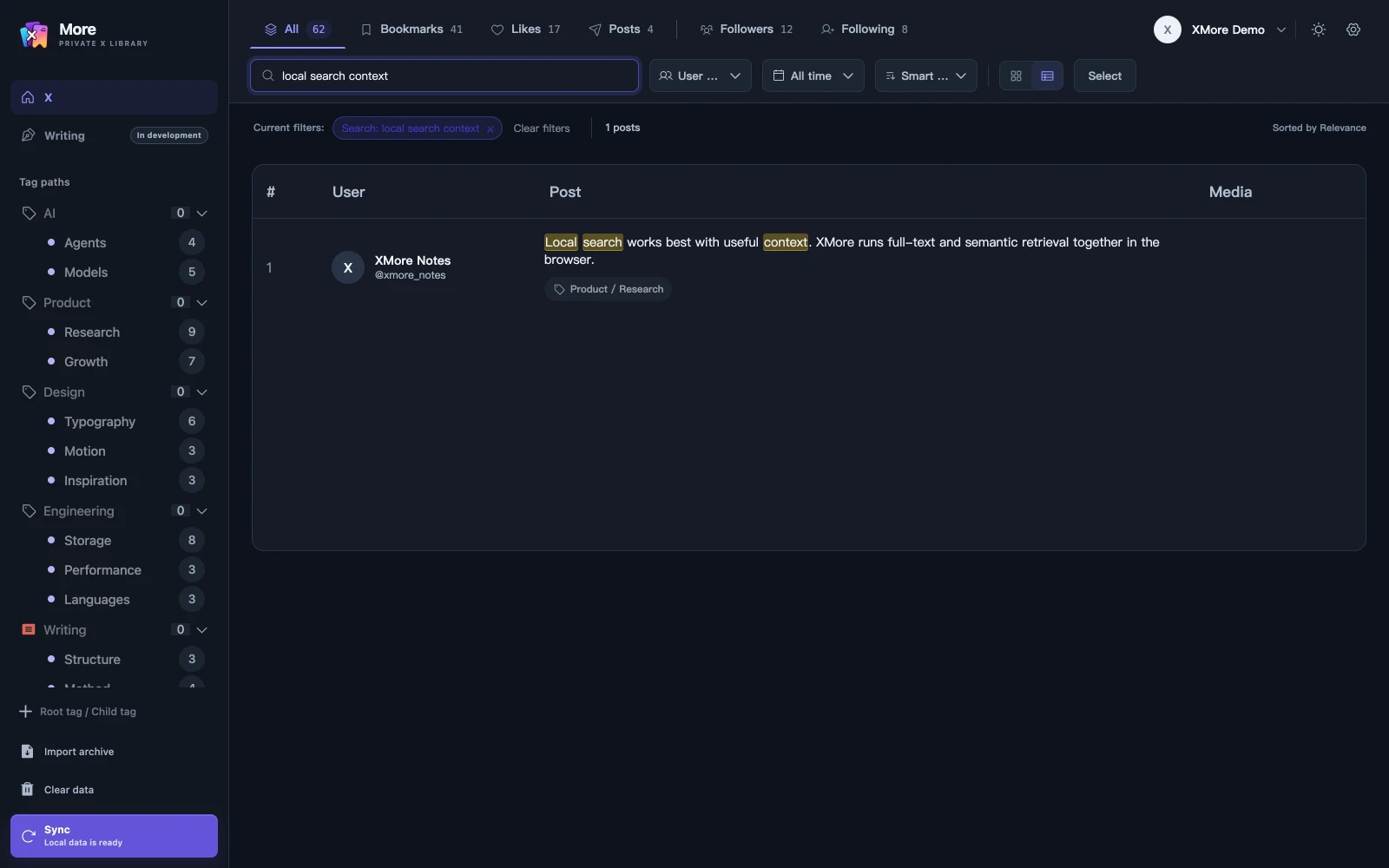
Start with the bookmarks in your library
Sign in to XMore with valid access, then use your own X account to sync bookmarks. You can also import supported X archive files. Search covers the content that has reached your current browser library; availability and sync progress determine what you can find.
- Sync the Bookmarks source or import an X archive
- Select Bookmarks to limit the search to that source
- Enter a keyword or describe the idea you remember
- Use author, date and tag filters to refine the results
Use keywords for exact phrases and meaning for fuzzy memories
Full-text search helps when you remember words from a saved post. Local multilingual semantic search helps when you remember an idea but have lost the original wording.
For example, try a distinctive phrase from a post about local search, then describe the same idea in your own words. Results depend on the content available in your library and the relevance of the query.
- Search post text, authors and tags
- Use the local multilingual model for semantic recall
- Add two levels of tags to make the next visit easier
Keep bookmarks connected to your other saved sources
A post can have both bookmark and like relationships while sharing one content record. You can search across sources or keep the Bookmarks filter active for a focused view. Read the guide to searching your own X likes for that workflow.
Understand the local data boundary
Full-text and semantic search run locally. XMore account services handle sign-in, sessions, subscriptions and bound-account details in the cloud. Optional AI sends required inputs through the Companion to your chosen model service after you enable it.
See local storage and AI data boundaries before enabling optional AI. Keep original archive files separately: clearing extension data or losing the device can remove your local library.
Common questions
Can I search bookmarks that have not synced yet?
Search covers posts already synced or imported into this browser. Check sync progress and source filters when an expected post is missing.
Does semantic search send my query to an AI provider?
The built-in semantic model runs locally. Optional AI for tasks such as tag suggestions and writing uses a separate, explicitly enabled connection to your selected model service.
Can I search bookmarks and likes together?
Yes. Both can enter the same local library while retaining their source relationships. Use the source filters to search them together or separately.
Does this search all of X?
This page describes your local library search. XMore also offers a separate advanced search panel on X that submits queries to X.
 morePRIVATE X LIBRARY
YOUR X, REMEMBERED
morePRIVATE X LIBRARY
YOUR X, REMEMBERED
Make your saved posts useful again.
Build a local X library from your bookmarks, likes and own posts.
Add XMore to Chrome